Screen Time for Kids: 15 Questions Parents Ask Most
Age-based screen guidelines, sleep and health effects, and practical tips to balance kids' device use—focus on content quality, routines, and screen-free zones.
 Pixley Team
Screen Time for Kids: 15 Questions Parents Ask Most
Wondering how much screen time is too much for your child? Kids today spend 6 to 9 hours daily on screens, depending on their age. But not all screen time is equal - quality and context matter more than rigid time limits. This guide explains age-specific recommendations, the effects of screen time on sleep, behavior, and health, and practical tips for balanced use.
Key Takeaways:
- Under 2 years: Avoid screens (except video calls).
- Ages 2–5: Limit to 1 hour/day of high-quality content.
- Ages 5–12: 30 minutes to 2 hours/day for recreation.
- Excessive screen use disrupts sleep, affects mood, and can cause physical health issues like obesity or eye strain.
- Prioritize educational, interactive content and set screen-free zones (e.g., bedrooms, dinner table).
By focusing on what kids do on screens, not just how much, you can create healthier habits while keeping technology a part of daily life.
Screen Time for Kids: Healthy Limits, Quality Content, and Parenting Tips
Screen Time Guidelines by Age
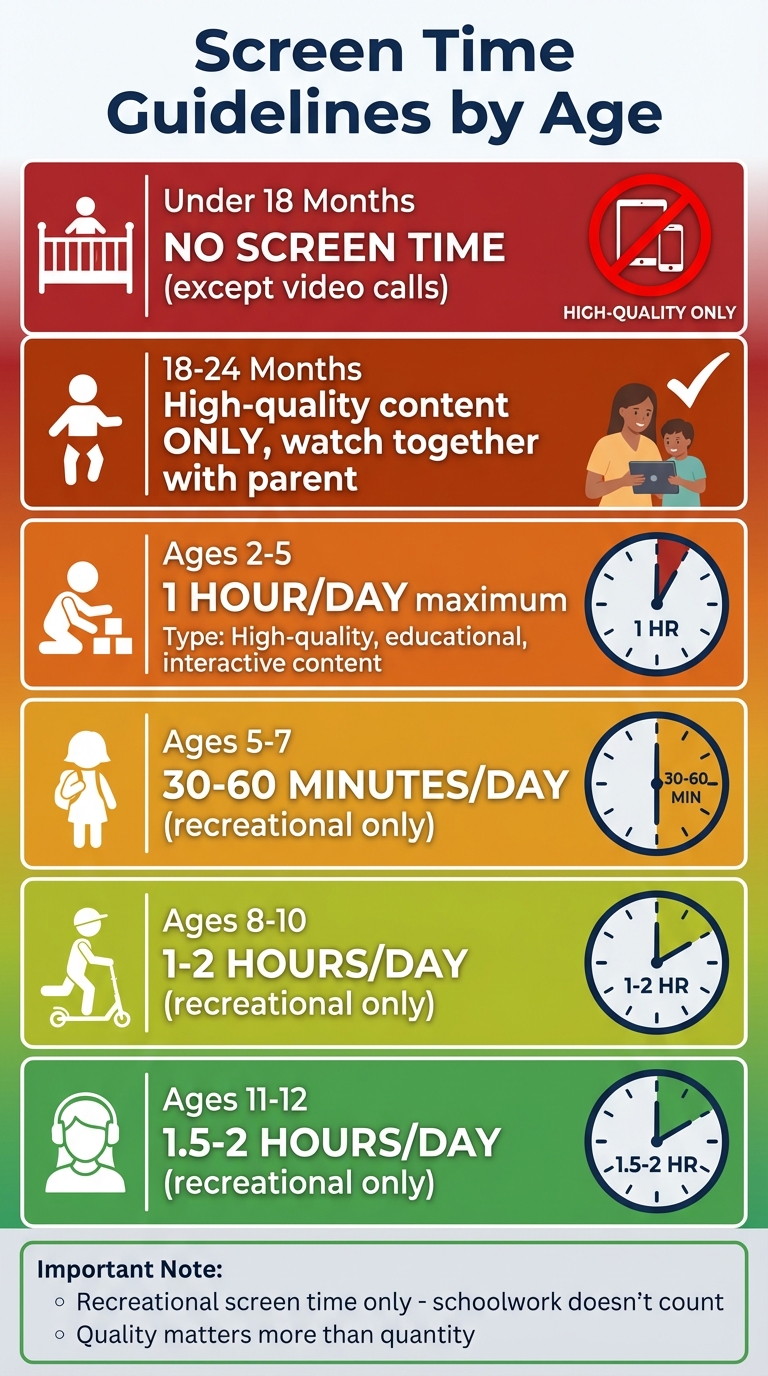
The right amount of screen time depends on your child’s developmental stage. Younger kids thrive on hands-on, real-world experiences to build critical brain connections, while older children can benefit from thoughtfully chosen digital content. Here’s what experts suggest for different age groups to help you manage screen time effectively.
Children Under 2 Years Old
For babies and toddlers under 18 months, the advice is straightforward: no screen time at all, except for video chatting with loved ones. Research shows that even so-called educational apps and videos don’t enhance language or cognitive skills at this age.
"There is no evidence, based on many studies that have been done by many scientists, that screens can enhance children's language acquisition or their cognitive development under the age of 18 months." - Dimitri Christakis, MD, MPH, Chief Science Officer of Children and Screens
This recommendation stems from the "transfer deficit" effect. Essentially, children under 3 often struggle to translate what they see on a screen into real-world understanding. For example, a toddler might watch a video about stacking blocks but won’t grasp the concept without hands-on practice. If you decide to introduce media between 18 and 24 months, stick to high-quality programs and watch together to help them make sense of what they’re seeing. Also, avoid background TV, as it can interfere with parent-child interactions and disrupt sleep.
Ages 2 to 5
Preschoolers can handle up to one hour per day of high-quality screen time. Choose programming that’s educational, age-appropriate, and free of rapid transitions or ads. Focus on active screen time, such as shows that encourage singing, problem-solving, or interaction, rather than passive viewing. Watching together can also reinforce learning by connecting screen content to real-world activities. Trusted resources like Common Sense Media can help you vet programs. To make transitions smoother, set clear start and stop times for screen use.
Ages 5 to 12
As kids grow, managing screen time becomes a balance between independence and boundaries. The WHO and AAP suggest these daily limits for recreational screen use:
- Ages 5–7: 30–60 minutes
- Ages 8–10: 1–2 hours
- Ages 11–12: 1.5–2 hours
These recommendations apply to entertainment only. Time spent on schoolwork or creative projects doesn’t count toward the total. Teaching self-regulation is crucial at this stage. Instead of using timers, establish specific time windows for screen use. Lead by example - narrate your tech use occasionally (e.g., "I’m checking the weather") to show that technology is a tool, not just a distraction. Encourage reading physical books over digital ones, as studies suggest kids may comprehend print better. Keep screens out of bedrooms and turn them off at least an hour before bedtime to promote better sleep and more meaningful face-to-face interactions.
"Building attention - being focused on one thing for an extended period of time and building deep experiences - cannot occur in a multitasking environment, it just cannot." - Martin Paulus, MD, Scientific Director and President, Laureate Institute for Brain Research
How Screen Time Affects Health, Behavior, and Sleep
Excessive screen time doesn’t just consume hours of the day - it can take a toll on your child’s physical health, mood, and sleep. Knowing these effects can help you create a healthier balance for your family.
Screen Time and Sleep Problems
Screens are one of the biggest culprits behind disrupted sleep in kids. The blue light from devices (wavelengths between 420–480 nm) interferes with the body’s natural sleep cycle by suppressing melatonin, the hormone that signals bedtime. Children are especially sensitive because their developing eyes allow more blue light to pass through, leading to about 88% melatonin suppression compared to 46% in adults. Even short bursts of screen use have an impact - 10 minutes of gaming can cost 17 minutes of sleep. Interactive activities like gaming or scrolling through social media also boost heart rate and alertness, making it harder for kids to wind down. On top of that, 36% of teens admit their devices wake them up during the night.
"Children are particularly sensitive to blue light exposure. Their developing eyes let in more blue light than adult eyes do, making them even more susceptible to its sleep-disrupting effects." - Dr. Sarah Chen, Pediatric Sleep Specialist
To safeguard sleep, try a "digital sunset" by turning off screens at least 60 to 90 minutes before bed. Set up a central charging station in a shared space for overnight device storage. Keep electronics out of bedrooms entirely. Instead, encourage calming activities like reading a physical book, listening to audiobooks, or light stretching before bedtime. If screens are unavoidable in the evening, use dark mode or blue light filters to reduce exposure.
Sleep isn’t the only thing affected by too much screen time - it also has a noticeable impact on kids’ behavior and mood.
Behavior and Mood Changes
Excessive screen use can lead to a range of behavioral shifts. You might notice tantrums when devices are taken away, increased irritability, a tendency to "zone out" during screen use, or a loss of interest in toys and outdoor play. Constant cravings for screens are another warning sign. Prolonged screen time can also shorten attention spans, making it harder for kids to focus on tasks like homework. For teens, spending seven or more hours daily on screens more than doubles the likelihood of experiencing depression or other mental health issues compared to those who limit screen use to an hour or less. Relying on screens to cope with boredom or frustration may also inhibit emotional resilience.
"Boredom is an essential part of childhood development... Unstructured time is the foundation for creativity, problem-solving, emotional resilience, and the development of executive function." - Kellyn Smythe, MS, Admissions Director, Pacific Quest
To counter these effects, establish clear boundaries for screen use. For example, set limits like "two activities, then we do puzzles" to make transitions easier. Visual timers can help younger kids adjust to these changes. Designate tech-free zones, such as the dinner table or bedrooms, to encourage face-to-face interaction and better sleep habits. If screen time feels out of control, reduce it gradually - about 15 minutes per week - to avoid withdrawal symptoms like anxiety or anger. These small adjustments can promote emotional growth and healthier habits.
But the impact of screen time doesn’t stop there - it also poses physical health risks.
Physical Health Risks
Sitting in front of a screen for hours often replaces time that could be spent being active, which increases the risk of obesity and heart problems later in life. Kids who spend more than two hours a day on screens have a 42% higher likelihood of becoming obese. Eating while glued to a screen can also lead to overeating and weight gain. While the average American child spends about three hours a day watching TV, total screen time can add up to five to seven hours daily.
Prolonged screen use is also tied to physical discomfort, including eye strain, headaches, neck and shoulder pain, and repetitive stress injuries like tendonitis or carpal tunnel syndrome. Research from the NIH shows that children with over seven hours of daily screen time experience thinning of the brain cortex, a region responsible for reasoning and critical thinking.
"Screen time should never come at the expense of exercise or outdoor time." - Dr. Sabiha Hussain, MD, Pediatrician, Scripps Coastal Medical Center
To combat these risks, encourage "active" screen time. For example, have kids do jumping jacks, stretches, or yoga during commercial breaks or while watching shows. Turn off background TV to prevent distractions from creative play. Opt for educational, interactive apps with clear stopping points instead of endless scrolling platforms. Most importantly, ensure screen time doesn’t replace daily exercise or outdoor activities to maintain a healthy balance.
How to Create a Balanced Screen Time Plan
Understanding how screen time affects your child is just the first step. Now, let’s talk about creating a balanced plan that works for your family. The goal isn’t to eliminate devices altogether but to establish a routine that fits your family’s needs. Start by observing your child for three days to identify patterns, triggers, and emotional responses to screen use.
Set screen time limits based on age-appropriate guidelines (e.g., no screen time for kids under 2, one hour for ages 2–5, and 1.5–2 hours for ages 6–13). Structure screen time around key routines - like allowing devices only after homework or chores are done. This way, screen time becomes a predictable and manageable part of the day rather than a constant point of negotiation.
Pay attention to what your child is watching, not just how much time they’re spending. Think of screen time like food: there’s “nutritious” content (interactive, educational, and thoughtfully paced) and “junk food” content (passive, fast-paced, and algorithm-driven). Opt for apps that encourage creativity and active engagement, and hold off on platforms that rely on endless scrolling or algorithmic feeds to protect your child’s developing brain.
"By zeroing in on duration, families are led to believe that managing screen use is a simple numbers game. Instead, consider what children are doing on their screens, who they are interacting with, and how the experience makes them feel."
- Katie Davis, Co-director of the UW Digital Youth Lab
Make transitions smoother with rituals like five-minute warnings, visual timers, or a clear signal to wrap up screen time. Writing down your family’s media guidelines and posting them in a visible spot - like the fridge - can help keep everyone on the same page.
Set Up Screen-Free Zones and Times
Creating screen-free spaces and times is a simple way to set boundaries that encourage better sleep, stronger family connections, and improved focus. For instance, keep devices out of bedrooms and designate common areas, like the living room, for screen use. Charging devices in a central location overnight can help prevent late-night scrolling.
Establishing “no-screen” periods is equally important. These could include times before school, during homework, at family meals, or right before bedtime.
"If the worry is that your child is having too much screen time, it's not about how much time that actually is. It's about what it infringes on."
- David Anderson, PhD, Clinical Psychologist, Child Mind Institute
Lead by example - kids notice if adults aren’t following the same rules. For instance, put your phone in a designated spot during meals or charge it outside your bedroom at night. Consistency is especially important during the early days of implementing these changes.
With these boundaries in place, let’s look at ways to fill the time with engaging, screen-free activities.
Screen-Free Activities for Kids
When screens are off, kids need fun and engaging alternatives. Work together as a family to create an “activity menu.” This could include options like crafts, reading, playing with pets, outdoor games, board games, or cooking. Post the list somewhere visible so kids can easily pick something to do when boredom strikes.
Activities like science experiments, building with blocks, or storytelling encourage creativity and problem-solving while offering unstructured time that helps kids develop emotional resilience and decision-making skills. If your child struggles with the new routine, try reducing screen time gradually - perhaps by 15 minutes per week - to ease the transition. Use simple cues like a timer or music to signal transitions, and for younger kids, visual schedules can help them understand when screen time is allowed.
Make Screen Time Educational with Pixley

Not all screen time is equal. When your child does use a device, choose tools that encourage active participation. Pixley is a platform that transforms passive viewing into active creation. It allows kids to turn their drawings and ideas into animated cartoons, helping them become storytellers instead of just consumers.
Pixley offers different plans to fit your family’s needs. The Free plan includes 200 Pixley Stars per month, enough to create 1.5-minute videos in a standard 16:9 format. The Pro plan ($11.99/month with an annual subscription or $14.99/month otherwise) provides 1,000 Pixley Stars monthly, allowing for 3-minute videos in a vertical 9:16 format and multilingual options. The Family plan ($18.99/month annually) extends video length to 5 minutes and includes 2,600 Stars per month.
Pixley encourages kids to solve problems, make creative decisions, and express themselves. Spending a few minutes asking your child, “What did you create?” or “How did you come up with that idea?” can deepen their learning experience.
"A 5-year-old watching a 45-minute long-form story on their iPad in the living room while their parent cooks dinner nearby is a much-preferred experience for a growing brain than a 5-year-old accessing YouTube shorts alone in their bedroom for 45 minutes."
- Keena McAvoy, Digital Wellness Educator
You can also use Pixley as a bridge to offline activities. For example, after creating an animated story, encourage your child to act it out with toys, draw the characters on paper, or write a sequel. Setting clear goals before each session - like “Let’s make two animations about your favorite animal” - and giving a five-minute warning before time is up can turn screen time into a meaningful, creative experience. This approach not only limits passive use but also turns screen time into a tool for learning and self-expression, aligning with a broader strategy for balanced screen use.
Conclusion: Building Healthy Screen Habits for Your Family
Managing screen time isn’t about sticking to a strict number of minutes each day. Instead, it’s about ensuring that devices don’t take the place of essential activities like sleep, exercise, schoolwork, face-to-face interactions, and imaginative play. The latest AAP guidelines emphasize focusing on how screens are used rather than just tracking time, especially considering the risks of autoplay, endless scrolling, and algorithm-driven content.
Think of screen time as just one part of your family’s day - not the main event. Use a simple developmental checklist: Is your child getting enough sleep, staying physically active, and connecting meaningfully offline? If everything checks out, you’re likely on the right path. But if screens are disrupting any of these areas, it’s time to make adjustments.
Once your routine feels balanced, shift your attention to shaping your child’s relationship with technology. Involve them in setting rules, lead by example with mindful device use, and prioritize content that sparks creativity and active participation over passive consumption. This approach not only safeguards daily routines but also equips your child to use technology as a tool for learning and creativity. As Regan Vidiksis, Senior Researcher at EDC's Center for Children and Technology, explains:
"Technology is just another medium in their lives and something that they need to learn to develop healthy habits around, with the support of their families and other media mentors".
Introduce tech-free zones, like the dinner table or the hour before bedtime, and gradually expand these moments. Consistency can lead to meaningful changes. Even small adjustments can strengthen your family's relationship with technology and help your child grow into a thoughtful, creative digital citizen.
FAQs
What counts as “high-quality” screen time?
High-quality screen time involves content that is age-appropriate, engaging, and designed to support learning. It focuses on encouraging positive behavior and creating meaningful connections. Unlike passive or mindless viewing, it emphasizes interactive or educational experiences that align with a child’s developmental needs.
How can I reduce screen time without daily battles?
To cut down on screen time without conflict, focus on small, gradual adjustments instead of sudden changes. Introduce fun, screen-free activities to keep your child engaged, and designate certain areas or times as tech-free - like family meals. Setting clear schedules for screen use can help establish boundaries. You can also make it a collaborative effort by allowing kids to earn screen time through completing tasks or responsibilities. Leading by example with your own habits and involving your child in planning a routine can make the transition easier and more enjoyable for everyone.
When should I worry about screen time becoming an addiction?
If your child starts showing signs of problematic screen habits, it's worth paying attention. Watch for things like withdrawal symptoms when they're not using devices, spending so much time on screens that it disrupts daily activities like sleep or homework, or struggling to limit their usage. You might notice behaviors such as irritability or ignoring responsibilities. Spotting these signs early gives you the chance to step in and guide your child toward healthier screen habits that balance learning, socializing, and downtime.
Keep Reading
- Age-Appropriate Digital Stories for Kids: Parent Guide
Learn how to choose age-appropriate digital stories for kids, with tips for story length, pacing, safety, co-viewing, and creative screen time.
- Cartoon Pacing for Kids: Why Slower Stories Help
Learn how cartoon pacing affects kids' attention, comprehension, and screen time quality, plus what parents should look for in healthier animated content.
- How to Choose Safe Digital Content for Kids in 2026
Layered approach to protect kids online in 2026: parental controls, platform vetting, privacy audits, AI safeguards, and digital literacy.
- All parenting & screen-time guides →