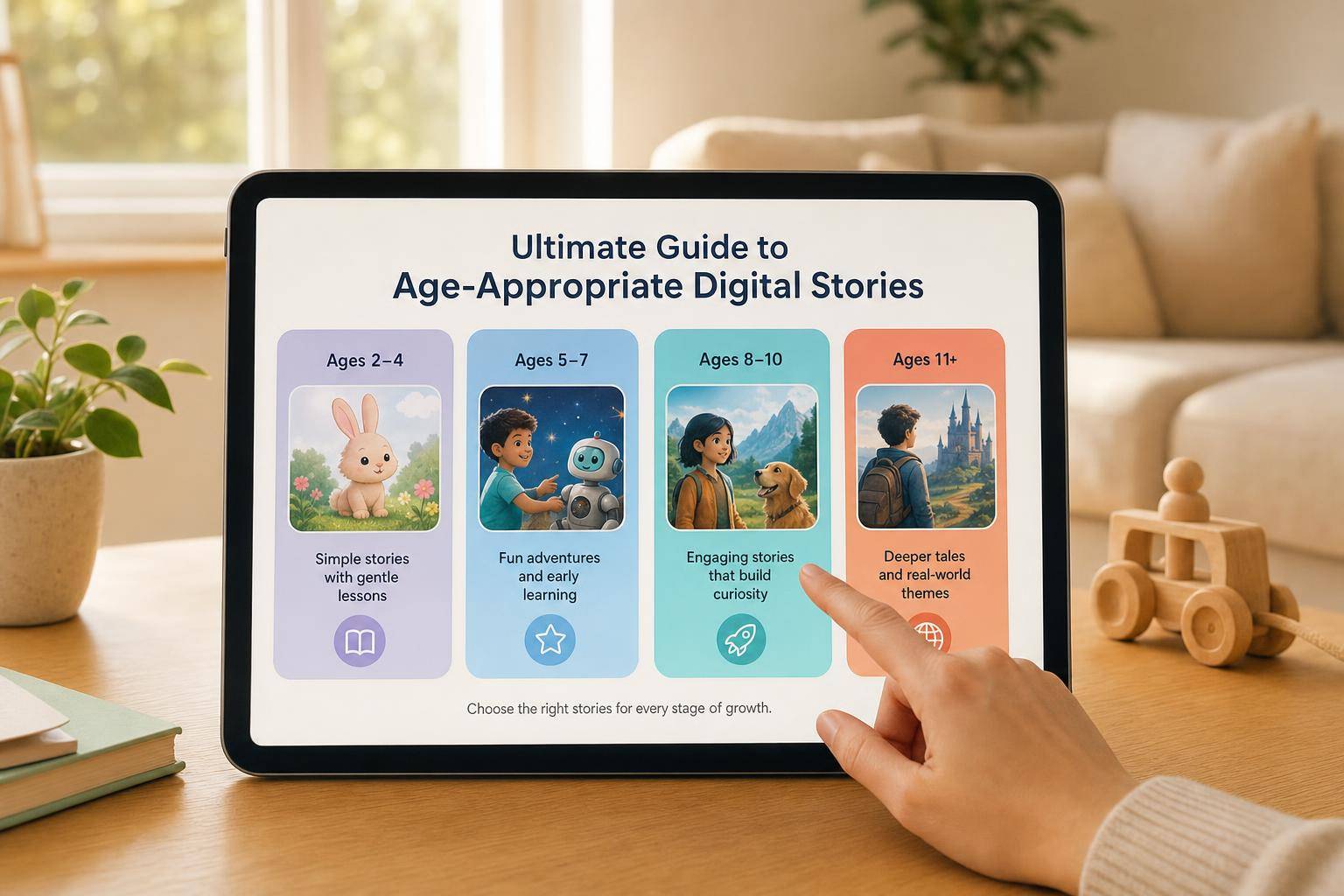
Age-Appropriate Digital Stories for Kids: Parent Guide
Learn how to choose age-appropriate digital stories for kids, with tips for story length, pacing, safety, co-viewing, and creative screen time.
 Pixley Team
Age-Appropriate Digital Stories for Kids: A Parent's Guide
A good digital story should feel like a story first.
It should have a clear beginning, a character your child can understand, a simple problem, and a moment where something meaningful happens. The screen is just the delivery method. What matters most is whether the story fits your child's age, attention span, emotions, and stage of development.
That is why age-appropriate digital stories matter.
A story that works beautifully for a 7-year-old may feel confusing or overstimulating for a 3-year-old. A story that is perfect for a preschooler may feel too simple for a child who is ready for choices, deeper questions, and bigger ideas.
This guide will help you choose better digital stories for kids by age group, spot red flags, and use tools like Pixley in a more intentional way.
Quick Takeaways
- Age-appropriate digital stories should match a child's attention span, vocabulary, emotional readiness, and ability to follow a plot.
- Younger children usually need shorter, calmer, co-viewed stories with familiar topics.
- Preschoolers often benefit from clear plots, repetition, simple questions, and gentle interaction.
- Children ages 6 to 8 can usually handle longer stories, more choices, richer vocabulary, and deeper themes.
- Look for calm pacing, clear lessons, safe emotional tone, no ads, and parent-guided interaction.
- The best digital stories invite kids to think, talk, draw, imagine, or create—not just tap and watch.
What Makes a Digital Story Age-Appropriate?
An age-appropriate digital story is not just "safe for kids." It is a story designed for the way children at a certain age understand the world.
That includes:
- Length: Can the child stay engaged without getting restless or overstimulated?
- Language: Are the words familiar enough to understand, with a few new words to learn?
- Plot: Can the child follow what happened first, next, and last?
- Emotion: Is the conflict manageable for the child's age?
- Pacing: Does the story give the child time to process each moment?
- Interaction: Does the child get to participate in a meaningful way?
- Safety: Is the experience ad-free, parent-guided, and free from adult content?
The goal is not to make every story educational in a school-like way. A story can teach kindness, patience, curiosity, problem-solving, creativity, or emotional awareness. The key is that the lesson should be clear enough for the child to understand and talk about.
A quick test:
After the story ends, can your child tell you who it was about, what happened, and how the character felt?
If the answer is yes, the story is probably closer to the right fit.
Why Digital Stories Need More Care Than Regular Videos
Digital stories can be wonderful. They can bring illustrations to life, support early language, introduce new ideas, and make storytelling feel exciting.
But digital stories also come with risks when they are not designed carefully.
Some apps and platforms rely on autoplay, ads, random recommendations, or endless tapping. Those features can turn storytime into passive scrolling. Instead of helping a child follow one meaningful story, the experience keeps pushing them to the next clip, next button, or next surprise.
For young children, that can make it harder to slow down, talk about what they saw, or connect the story to real life.
The American Academy of Pediatrics encourages families to think about media quality, co-viewing, and family routines instead of treating screen time as only a timer problem. Their Family Media Plan is built around that idea: media works best when families use it intentionally.
So the better question is not only:
"How much screen time is okay?"
It is also:
"What kind of story is this, and what is my child doing with it?"
Age-by-Age Guide to Digital Stories
Children develop quickly between ages 2 and 8. The same story format will not work equally well for every child. Use these age ranges as a starting point, then adjust based on your child's personality, language level, and reaction after watching.
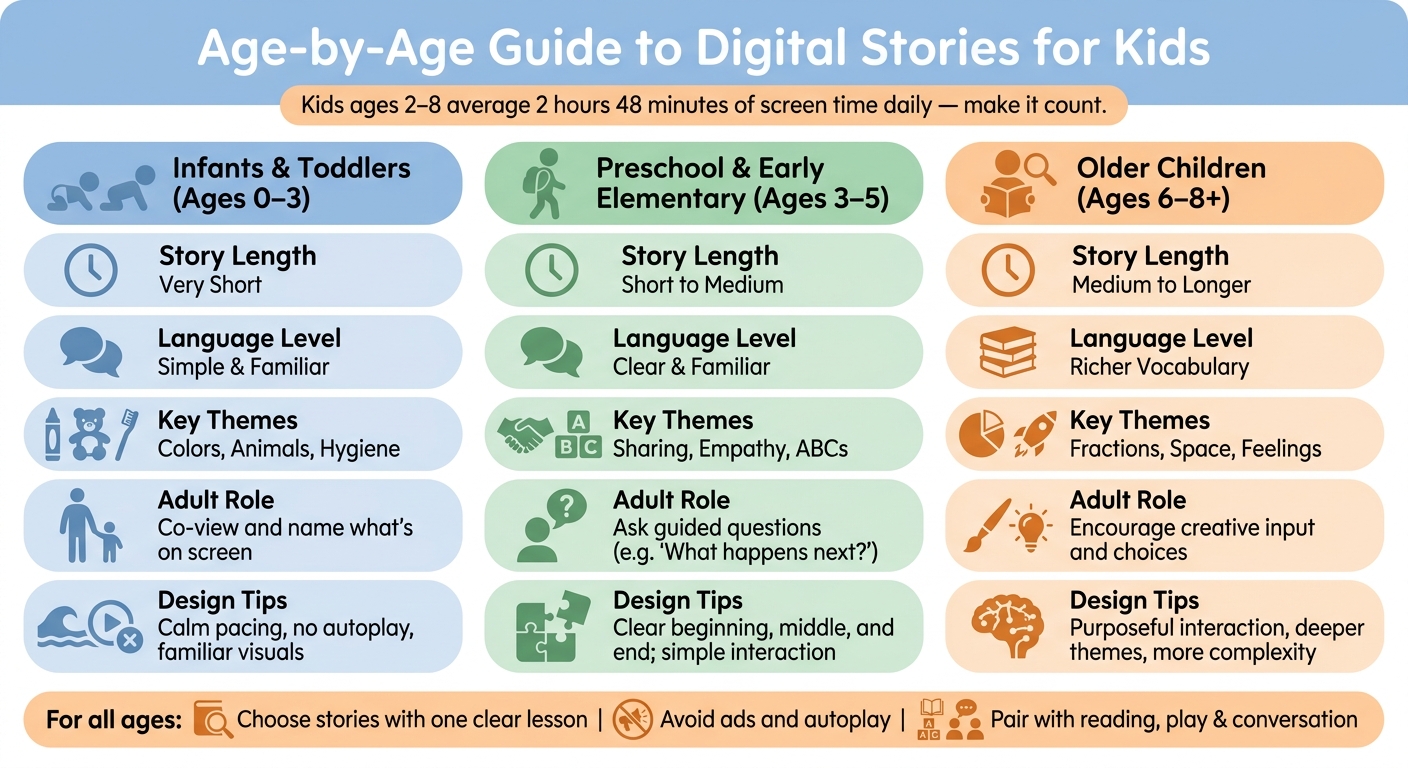
A quick age-by-age comparison of story length, language, themes, and the adult's role.
Ages 0–2: Keep Screens Limited and Co-Viewed
For babies and very young toddlers, digital stories should not replace real-world interaction, books, songs, play, or caregiver conversation.
At this age, children learn best from warm back-and-forth interaction with people. If you use digital media, keep it brief, calm, and shared with an adult. The adult role matters more than the app.
A better digital story for this age is:
- Very short
- Slow and gentle
- Focused on familiar objects
- Free of ads and autoplay
- Watched with a parent or caregiver
- Paired with real-world naming and pointing
Good topics include:
- Animals
- Colors
- Family routines
- Bath time
- Bedtime
- Simple emotions
- Familiar sounds
Try saying things like:
"Look, the puppy is sleeping."
"That ball is red."
"Can you wave bye-bye?"
For this age, the digital story should support connection. It should not become solo entertainment.
Ages 3–5: Choose Clear, Calm Stories With Simple Interaction
Preschoolers are ready for more story structure.
They can follow a simple beginning, middle, and end. They can understand basic problems like losing a toy, learning to share, feeling nervous, or trying again. They can also answer simple questions before, during, or after the story.
A better digital story for ages 3 to 5 is:
- Short
- Predictable
- Emotionally safe
- Clear in its lesson
- Repetitive enough to follow
- Built around familiar feelings and situations
- Interactive in simple ways
Good topics include:
- Sharing
- Taking turns
- Trying new foods
- Saying sorry
- Being brave
- Making friends
- Letters, numbers, colors, and shapes
- Feelings like happy, sad, scared, and proud
This is a great age for gentle prompts:
- "What do you think happens next?"
- "How does the bunny feel?"
- "Should the dragon share the toy?"
- "What would you do?"
For preschoolers, interaction should not be complicated. A simple choice is enough.
Instead of asking:
"What should the whole story be about?"
Try:
"Should the bear go to the garden or the moon?"
That gives the child control without making the experience overwhelming.
Ages 6–8: Add Choice, Detail, and Deeper Themes
Children ages 6 to 8 can usually handle longer stories and more complex ideas.
They may enjoy mysteries, missions, chapter-like story series, and characters who grow over time. They can also handle more detailed vocabulary when the story gives enough context.
A better digital story for ages 6 to 8 is:
- Longer, but still focused
- Built around a clear problem and resolution
- Richer in vocabulary
- More open to choices
- Connected to real interests
- Able to include deeper emotional or academic themes
Good topics include:
- Space
- Oceans
- Dinosaurs
- Inventions
- Fractions
- Reading confidence
- Teamwork
- Friendship problems
- Resilience
- Curiosity
- Responsibility
This is the age when kids can help shape the story more actively. They might choose the setting, design the hero, decide the problem, or pick the lesson.
Try asking:
"What should the character learn by the end?"
"What is the hardest part of the adventure?"
"What would make this story funnier, braver, or kinder?"
"Should this become a series?"
For older kids, the best digital stories often feel less like watching and more like creating.
Age-Appropriate Digital Story Checklist
Use this simple checklist before choosing or creating a digital story.
| What to Check | Better Fit | Red Flag |
|---|---|---|
| Story clarity | Clear beginning, middle, and end | Random scenes or confusing plot |
| Pacing | Calm enough to follow | Rapid cuts, loud surprises, constant chaos |
| Lesson | One clear idea or value | Too many messages or no point |
| Language | Matches the child's age | Too complex, sarcastic, or random |
| Emotion | Safe conflict with a gentle resolution | Scary, intense, or adult themes |
| Interaction | Meaningful choices, questions, drawing, or discussion | Passive tapping or endless clicking |
| Safety | Ad-free, parent-guided, reviewable | Ads, autoplay, unmoderated content, or open feeds |
| After-story value | Child can talk, draw, or play from it afterward | Child only wants "one more" immediately |
The best digital story is not always the flashiest one. Often, the better choice is the story your child can understand, retell, and keep imagining after the screen turns off.
What to Avoid in Kids' Digital Stories
Some red flags are obvious. Others are easy to miss.
Watch out for:
- Autoplay loops that never end
- Ads or sponsored content aimed at children
- Random recommendations outside your control
- Stories with no clear beginning or ending
- Scary imagery or intense conflict
- Adult humor or themes
- Characters that behave in ways you do not want copied
- Fast cuts that make the story hard to follow
- Unmoderated chat or social features
- Apps that collect more information than necessary
- Experiences where the child only taps without thinking
A story should not feel like a slot machine for attention. It should feel like an experience your child can understand.
How to Make Digital Stories More Active
A digital story becomes more valuable when it continues beyond the screen.
Before watching, ask:
"What do you think this story will be about?"
During the story, ask one simple question:
"How do you think the character feels?"
After the story, invite your child to create something:
- Draw a new character
- Act out the ending with toys
- Make up the next episode
- Retell the story to a sibling
- Build the setting with blocks
- Choose a new lesson for the hero
- Talk about a time they felt the same way
This turns screen time into a bridge toward language, creativity, and play.
How Pixley Helps Create Age-Appropriate Digital Stories
Pixley is designed for families who want screen time to feel more creative and parent-guided.
Instead of putting children in front of an endless feed, Pixley helps kids turn their own drawings, characters, and ideas into personalized animated stories. Parents can guide the story's theme, so the experience can match the child's age, interests, and learning goals.
That matters because age-appropriate storytelling is not just about the video itself. It is about the whole process:
- The child creates an idea.
- The parent chooses a theme or lesson.
- The story becomes personalized.
- The family can watch, talk, and build on it.
A child might draw a moon bear. A parent might choose a theme like bravery. The story could become a gentle adventure about trying something new.
Another child might draw a rocket cat. A parent might choose early math. The story could become a space mission where the character counts stars, shares supplies, or solves a simple pattern.
Pixley works best when parents keep the story focused on one age-appropriate idea:
- "Learning to share"
- "Being brave at bedtime"
- "Trying again after a mistake"
- "Counting to ten"
- "Being kind to a new friend"
- "Exploring planets"
- "Understanding big feelings"
The child brings the imagination. The parent guides the purpose.
How to Use Pixley by Age
For Ages 2–3
Keep the story very simple.
Use one character, one familiar setting, and one tiny lesson.
Example:
"Milo the puppy learns to clean up his blocks before bedtime."
After watching, point to familiar objects:
"Where are the blocks?"
"Can you say goodnight to Milo?"
For Ages 3–5
Use clear emotions and simple choices.
Example:
"Luna the bunny feels nervous on her first day at rainbow school. She learns to ask a friend to play."
After watching, ask:
"How did Luna feel at first?"
"What helped her feel better?"
For Ages 6–8
Let your child help build the story.
Example:
"Nova the rocket cat travels to a new planet and has to solve three clues to help the lost stars find their way home."
After watching, ask:
"What should happen in episode two?"
"What lesson should Nova learn next?"
This keeps the experience creative instead of passive.
Building a Healthy Digital Story Routine
Age-appropriate digital stories work best when they are part of a routine.
Try this simple structure:
1. Start Offline
Begin with a drawing, a question, or a real-life moment.
Examples:
- "Draw a character for tonight's story."
- "What is something brave you did today?"
- "Should tonight's story be about space, animals, or friendship?"
2. Choose One Goal
Pick one lesson or focus.
Examples:
- Sharing
- Patience
- Counting
- Trying again
- Handling frustration
- Making friends
- Curiosity
One story does not need to teach everything. One clear idea is better than five scattered ones.
3. Watch Together When Possible
Co-viewing does not mean you need to narrate the whole time. Just being nearby and asking one or two questions can help your child connect the story to real life.
4. End With a Creative Follow-Up
After the story, do something small:
- Draw the next scene
- Make a new ending
- Choose tomorrow's character
- Act out the story
- Talk about the lesson
This helps the story become part of your child's imagination, not just another video.
5. Keep a Clear Ending
Avoid sliding from one story into the next without a plan.
A helpful phrase:
"That was our story for today. Tomorrow, we can make the next adventure."
A clear ending helps screen time feel complete.
Choosing Better Digital Stories at a Glance
Here is the simple version.
For very young children, choose stories that are short, familiar, and co-viewed.
For preschoolers, choose stories with clear plots, gentle pacing, and simple questions.
For ages 6 to 8, choose stories with more choice, deeper themes, and room for the child's ideas.
At every age, look for stories that are safe, calm, purposeful, and easy to talk about afterward.
The best digital story should leave your child with something to say, draw, ask, or imagine.
Watch: Choosing Better Screen Time for Kids
For more on picking healthier stories and screen time for your child, watch this short video:
Final Thoughts
Digital stories can be more than screen time.
When chosen well, they can help children build language, understand emotions, practice problem-solving, and see their own ideas come to life. But the story needs to fit the child.
A good age-appropriate digital story does not overwhelm. It gives the child enough time to understand what is happening. It keeps the lesson simple. It avoids ads and endless feeds. It invites conversation. And ideally, it encourages the child to create something of their own.
That is the kind of screen time families can feel better about: not just watching, but storytelling.
FAQs
What is an age-appropriate digital story?
An age-appropriate digital story is a digital or animated story that matches a child's age, attention span, language level, emotional readiness, and ability to follow a plot.
How long should a digital story be for young kids?
For younger children, shorter is usually better. Toddlers and preschoolers often do best with brief stories that have a clear beginning, middle, and end. Older children can usually handle longer stories with more detail.
What should parents look for in digital stories for kids?
Parents should look for clear plots, calm pacing, age-appropriate language, safe emotional tone, no ads, no autoplay, and opportunities for conversation or creativity.
Are digital stories good for kids?
Digital stories can be good for kids when they are high-quality, age-appropriate, parent-guided, and balanced with reading, play, sleep, and real-world interaction.
What are red flags in digital stories for children?
Red flags include autoplay, ads, scary content, adult themes, unmoderated chat, random recommendations, fast chaotic pacing, and stories that encourage passive clicking instead of meaningful participation.
How can Pixley help make digital stories age-appropriate?
Pixley helps children turn their drawings and ideas into personalized animated stories. Parents can guide the theme or lesson, making the story more suitable for the child's age, interests, and developmental stage.
Keep Reading
- Cartoon Pacing for Kids: Why Slower Stories Help
Learn how cartoon pacing affects kids' attention, comprehension, and screen time quality, plus what parents should look for in healthier animated content.
- Teaching Visual Metaphors With Cartoons: A Parent and Teacher Guide
Learn how to teach visual metaphors to kids using cartoons, comic panels, drawings, and personalized stories. Help children connect images to feelings and ideas in simple steps.
- How Stories Build Emotional Intelligence in Kids
Learn how stories build emotional intelligence in kids by helping them name feelings, practice empathy, and build calm responses through reading, role-play, and Pixley.
- All parenting & screen-time guides →