
How to Choose Safe Digital Content for Kids in 2026
Layered approach to protect kids online in 2026: parental controls, platform vetting, privacy audits, AI safeguards, and digital literacy.
 Pixley Team
How to Choose Safe Digital Content for Kids in 2026
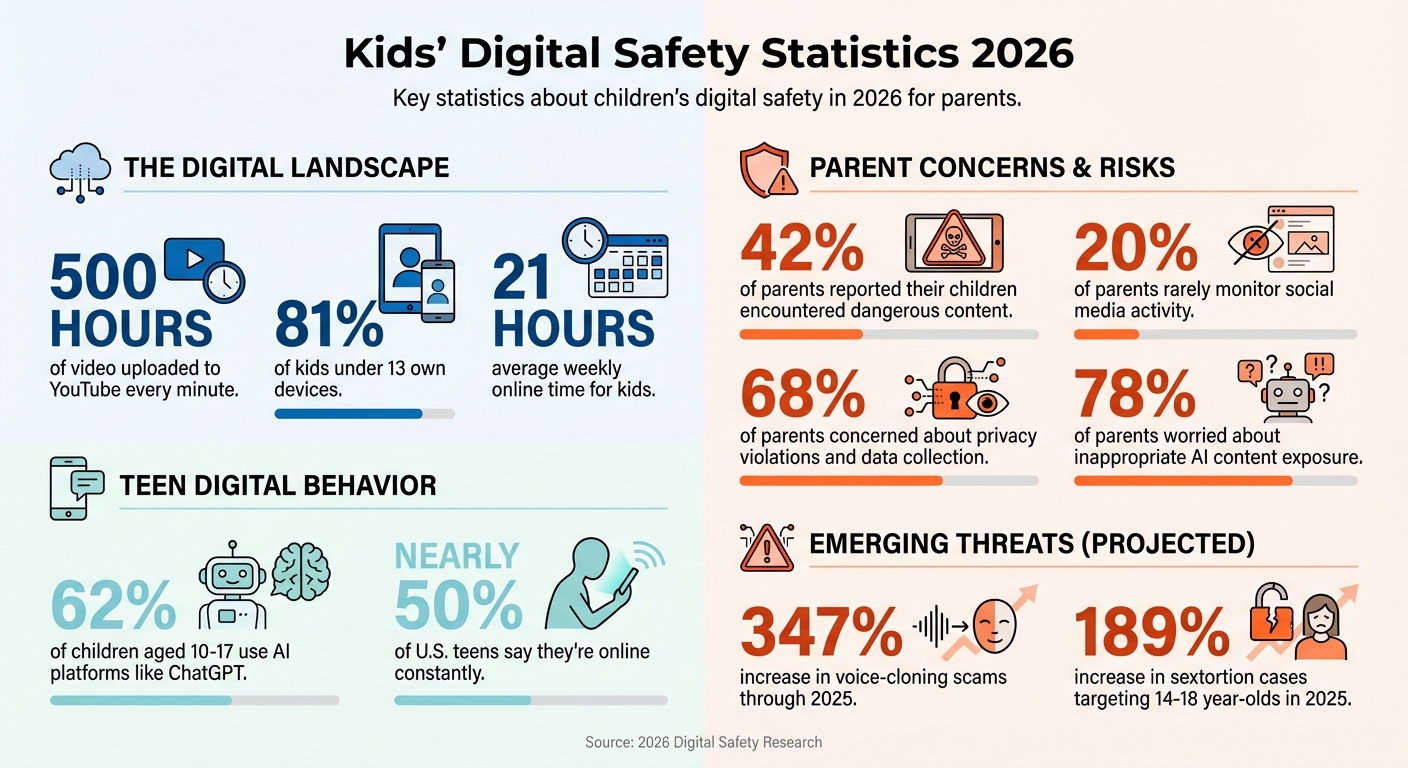
In 2026, keeping kids safe online is harder than ever. With over 500 hours of video uploaded to YouTube every minute and the rise of AI-generated content, harmful material can easily slip through. Algorithms prioritize engagement over safety, exposing kids to overstimulating, low-quality, or even dangerous content. Meanwhile, 81% of kids under 13 now own devices, spending an average of 21 hours weekly online, often in unmonitored spaces like gaming platforms.
To protect your child, you need a layered approach:
- Parental Controls: Use tools like Apple Screen Time or Google Family Link to set limits and block inappropriate content.
- Platform Safety: Choose platforms with strong moderation and whitelisted content (e.g., Pixley).
- Privacy Settings: Regularly review app permissions and disable unnecessary data collection features like location tracking.
- Teach Digital Literacy: Help kids recognize red flags, avoid off-platform chats, and report harmful interactions.
How To Make YouTube Safer For Kids In 2026 (Supervised Account)
Common Risks in Children's Digital Content
In 2026, 42% of parents reported their children encountered dangerous content, and 20% admitted they rarely monitor social media activity. These statistics highlight the growing challenges in managing platform-specific safety risks.
Inappropriate Content and Wrong Age Levels
Children today face exposure to content that ranges from subtly inappropriate to overtly harmful. Explicit material can be disguised in seemingly innocent videos, while viral challenges featuring graphic violence encourage risky behavior. Alarmingly, some platforms now host content promoting self-harm, eating disorders, or extremist ideologies, all of which can deeply influence impressionable young minds.
Platforms with minimal content moderation, like UpScrolled and Clapper, increase the likelihood of encountering unsuitable material. The rise of AI technologies adds another layer of concern. For instance, AI chatbots such as PovChat AI can foster interactions involving adult themes, and deepfake videos make it easier for malicious actors to create fake content for impersonation or cyberbullying.
Cybersecurity expert Pete Canavan highlights the severity of these risks:
"Basically any video can be put on TikTok - good or bad, clean or explicit. This presents a huge problem for parents of young children, but really for any age under 18".
Beyond explicit content, low-quality, overstimulating videos with rapid pacing and constant noise can negatively impact developing brains. These videos encourage impulsive clicking and can overstimulate children. Parents should be alert to behaviors like frequent clearing of browser history, using incognito mode, or hiding apps under harmless names.
Privacy and Data Security Issues
Ensuring age-appropriate content is only part of the equation - data security is equally critical. Many platforms now collect sensitive information by default, including biometrics, IDs, and geolocation data. Weak account protections, such as reused passwords or the lack of multi-factor authentication (MFA), leave children's accounts vulnerable to hacking and identity theft.
The commercialization of children's data presents another alarming issue. Aggressive advertising, manipulative influencer content, and gambling-like features in games (like loot boxes) exploit personal data while targeting wallets. Parents should routinely audit app permissions through device settings (Privacy > Tracking/Location) to identify apps accessing unnecessary data, such as location or contacts. Setting a digital spending limit for in-game currency - treating "Robux" as an allowance - can also help reduce the risks posed by exploitative game mechanics.
Cyberbullying and Online Interactions
Beyond content and privacy concerns, harmful online interactions remain a pressing issue. Grooming often follows a predictable pattern: public discovery, private chats, secrecy, escalating requests (like photos or personal details), attempts to move off-platform, and finally, threats or blackmail.
Predators are becoming increasingly resourceful, even using unconventional methods to initiate contact. For example, they might follow a child’s public Spotify playlist and use its title or description as a way to signal a request to move to a private platform. Additionally, live-streaming apps like C2 Live and Favorited (launched in late 2025) often lack sufficient moderation, increasing the risk of children encountering inappropriate content during live broadcasts.
Establishing a "No Off-Platform" rule is essential. If someone suggests moving a conversation from a game like Roblox to private apps like Snapchat or Kik, it should be treated as a serious warning sign. Parents should also watch for changes in behavior, such as becoming overly attached to screens, showing aggression when asked to log off, or appearing anxious after being online. Teaching children exit strategies - like saying, "I'm stepping away from this chat" - can empower them to handle peer pressure. Additionally, technical measures such as disabling direct messages from strangers and setting accounts to private provide an extra layer of safety.
How to Evaluate Platform Safety Features
Safe platforms go beyond flashy promises - they deliver real protection through a layered approach. This typically involves network filtering, device controls, and app-specific settings. Together, these layers create a safety net: if one measure falters, others are there to catch potential risks.
Key Safety Criteria to Look For
When evaluating a platform, start by checking whether it employs whitelisting or blacklisting. Whitelisting allows only pre-approved content, offering a proactive approach to safety. In contrast, blacklisting tries to block harmful material after it's uploaded - an approach that often falls short with today’s massive content volumes. Even with AI filters and human moderators, some harmful content can slip through. Whitelisting eliminates this risk by removing algorithm-driven discovery altogether.
Next, confirm COPPA compliance - this ensures the platform adheres to federal privacy laws designed to protect children under 13. It’s also important to verify that the platform doesn’t use kids’ conversations or data to train AI models. Strong communication safeguards are essential, too. Look for options to disable chat for users under 13, limit messaging to approved contacts, and hide usernames from public searches.
Another key factor is whether the platform relies on algorithm-driven content or human curation. Algorithm-driven platforms often prioritize engagement, which can lead to overstimulation and excessive screen time. Human-curated platforms, on the other hand, focus on safety and educational value. To assess this, try a quick “5-Minute Vibe Check”: watch sample content for rapid cuts, loud voices, heavy commercialism, or signs that it leaves your child overstimulated. Additionally, disable one-tap purchases and require password confirmation for transactions to prevent sneaky in-app spending.
By following these steps, you’ll be better equipped to identify platforms that genuinely prioritize child safety.
Pixley's Safety Features for Kids' Content
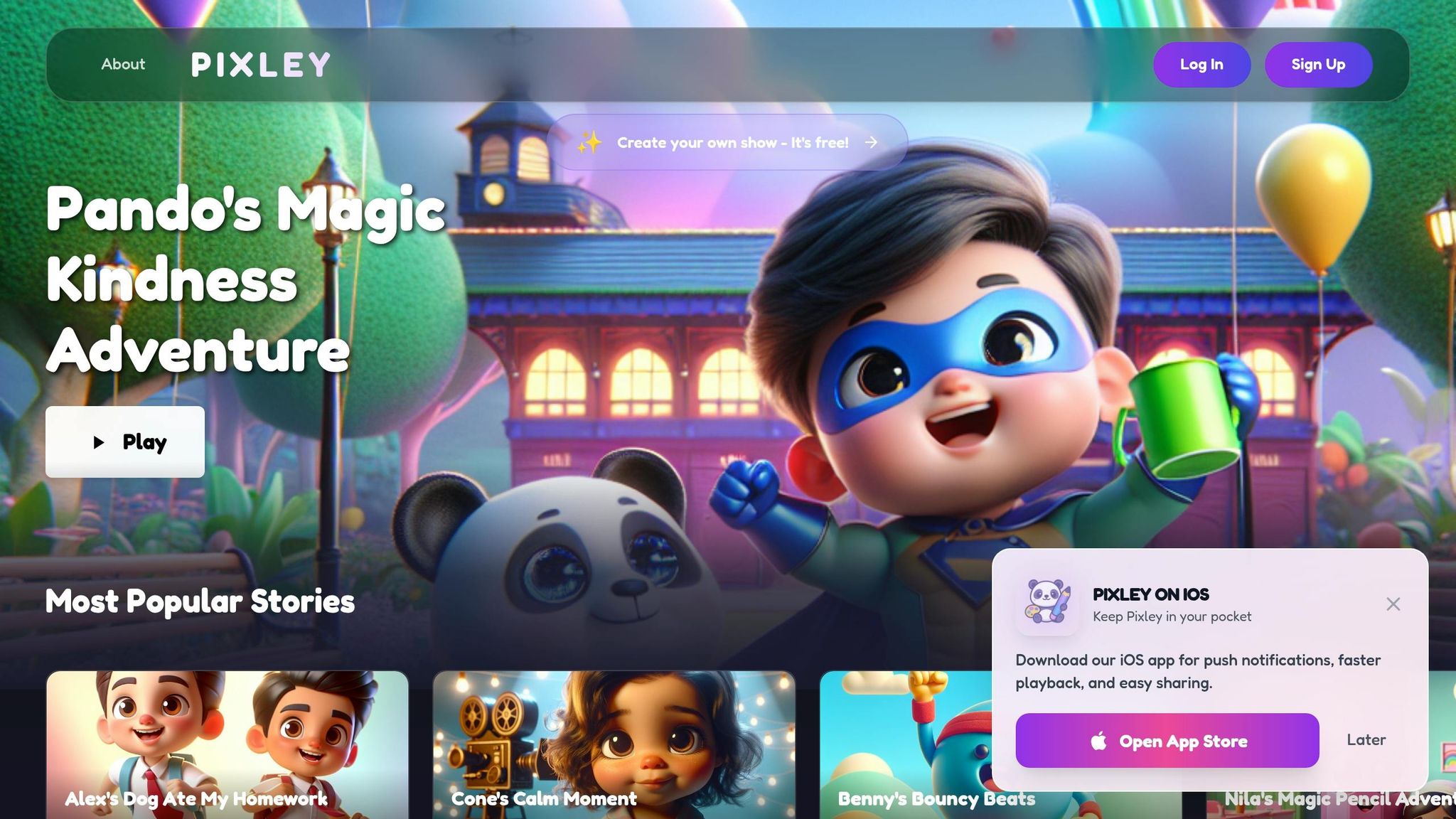
Platforms like Pixley are built with these safety principles in mind. Pixley takes a unique approach by removing algorithm-driven content entirely. Instead, parents can create personalized animated cartoons based on their child’s drawings and interests. This means you control what your child watches - no surprise recommendations, no hidden ads, and no interactions with strangers.
Pixley’s system is designed to keep content creation within a secure environment. There are no public messaging features, comment sections, or social tools that could expose children to strangers. Families can choose to share content publicly in the Storyverse community, but even here, safeguards are in place to ensure a controlled experience. Features like video downloads and multilingual support (available on higher-tier plans) add extra layers of safety and customization. Plus, the Pixley Stars currency system allows parents to manage content creation without worrying about unexpected charges.
This thoughtful design makes Pixley a standout option for parents seeking a secure platform for their kids.
Checklists for Selecting Age-Appropriate Content
Choosing content that aligns with your child's developmental needs takes more effort than simply glancing at a rating label. While traditional ratings highlight language or mature themes, they often fail to address content quality. For instance, many apps set a minimum age of 13 to comply with COPPA (Children’s Online Privacy Protection Act) rules, even if the content seems designed for younger audiences. This means that age ratings alone may not guarantee that the content is suitable for your child.
Checking Age Ratings and Content Moderation
To start, dig into the reasoning behind a platform's age rating. A "12+" or "13+" label might signify mature themes like violence or strong language, but it could also indicate that the platform collects data to meet privacy regulations. For a quick assessment, try a 5-Minute "Vibe Check" (as explained earlier). This involves looking for signs of overstimulating content, such as rapid scene changes, loud audio, or anything overly chaotic in sample material. These cues often reveal more about the content's suitability than the official rating does.
Next, consider whether the content encourages active engagement or just passive consumption. Quality content inspires kids to create, think critically, or explain what they've learned (a method sometimes called the "Teach-Back" approach). On the flip side, low-quality content often involves passive watching or repetitive tapping.
Finally, review the platform's moderation practices. Does it rely on human oversight, AI filters, or whitelisted channels? Given that about 500 hours of video are uploaded to YouTube every minute, it's impossible for all content to be manually reviewed. Whitelisting - where only approved channels are accessible - can provide a more reliable layer of safety.
While content quality is key, protecting your child's data is equally important for a safer digital experience.
Reviewing Privacy Policies and Family Linking Tools
Understanding a platform's privacy policies is essential. Look for clear statements about how your child's data is handled, and confirm that the platform complies with COPPA. Check for commitments to "minimal data collection" and verify that the platform does not sell data to advertisers or third parties. Parents should also have the ability to review, export, or delete their child's data at any time. If these rights aren't explicitly mentioned, consider it a warning sign.
"COPPA isn't just a legal checkbox - it's a signal that a company designed their product with children's wellbeing in mind."
- Jennifer Martinez, Child Privacy Advocate
To add another layer of control, use family linking tools like Apple Family Sharing or Google Family Link. These tools let you create child-specific accounts with age-appropriate settings pre-applied. Features like "Ask to Buy" ensure that in-app purchases or new downloads require parental approval. Regularly audit app permissions - does the app truly need access to your child’s contacts, photos, or GPS?. Since privacy settings often change with updates, schedule quarterly reviews of these settings.
Be on the lookout for manipulative design tactics, such as flashing notifications or countdown timers, that pressure kids into making hasty decisions. With 68% of parents expressing concern over privacy violations and data collection involving their children, these steps can help safeguard your family's digital privacy.
These checklists provide a strong starting point for creating safer online experiences, while ongoing digital literacy education remains essential.
Tools and Settings for Safe Digital Use in 2026
Keeping kids safe online involves more than just relying on platform safety features. It requires layering protections at the network, device, and app levels. This three-pronged approach ensures a secure digital environment for children, helping parents stay ahead of potential risks.
How to Set Up Device Parental Controls
Start by using the parental controls built into your devices. Tools like Apple Screen Time and Google Family Link offer excellent options, especially for families sticking to one ecosystem. You can schedule downtime - for instance, locking devices at 9:00 p.m. to maintain healthy sleep patterns - and require parental approval for app downloads to prevent unauthorized installations.
For broader protection, configure DNS filtering at the router level using free services like OpenDNS Family Shield or CleanBrowsing. This setup blocks adult content across all devices connected to your Wi-Fi, including smart TVs and gaming consoles, without requiring individual installations. Don’t forget to enable SafeSearch on web browsers and activate Restricted Mode on YouTube. However, keep in mind that these settings can sometimes be bypassed if a child logs out or uses incognito mode.
"The default settings on almost every device and app are designed to maximize engagement and data collection, not protect children." - Screenwise Parent Guide
In 2026, YouTube introduced more parental controls for Shorts, allowing parents to set time limits or block the short-form feed entirely at the account level. Since updates can occasionally reset these settings, it’s a good idea to review them every few months to ensure they remain active.
With these protections in place, the next step is to address the safety of AI interactions.
AI Chatbot Safeguards and Filters
AI tools are becoming a common part of kids’ digital experiences, with 62% of children aged 10–17 using platforms like ChatGPT. To ensure these interactions remain safe, modern AI safeguards include context-aware filtering and age-appropriate responses tailored to different age groups (e.g., 5–9, 10–12, or 13–18 years).
The safest AI environments are "walled gardens" that rely on curated data rather than unrestricted internet access. To monitor AI interactions, enable conversation visibility in the app and confirm that the platform complies with COPPA regulations for children under 13. Also, check privacy settings to ensure your child’s data isn’t being used to train public AI models. Features like Tutor Mode can help older kids solve problems while maintaining academic honesty.
Experts recommend keeping AI-enabled devices in shared spaces like living rooms rather than bedrooms. This "Living Room Rule" naturally discourages kids from testing the boundaries of content filters. With 78% of parents concerned about inappropriate content exposure through AI, these precautions are essential for creating a safer digital experience.
Free vs. Premium Plans: Safety Features Comparison
Built-in parental controls are a good starting point, especially for families using a single ecosystem. However, premium tools shine when managing mixed-device setups. Apps like Qustodio ($138/year), Bark ($99/year), and Norton Family ($50/year) provide advanced monitoring, including AI-powered scanning of texts and social media for signs of bullying or self-harm risks.
Free tools, such as YouTube’s Restricted Mode, can be easily bypassed through incognito mode or account switching. Premium solutions, on the other hand, offer stronger protections against VPNs and other workarounds. For YouTube, whitelist-based tools like WhitelistVideo ($48/year) let parents approve specific channels while disabling the recommendation algorithm entirely - a major step up from standard filtering.
| Feature | Free/Built-in (e.g., Family Link) | Premium Apps (e.g., Bark, Qustodio) | Whitelist Tools (e.g., WhitelistVideo) |
|---|---|---|---|
| Cost | Free | $50–$150/year | ~$48/year |
| Ecosystem | Single (Apple or Google) | Cross-platform (Mixed) | Platform-specific (YouTube) |
| Monitoring | Basic (Time/App limits) | Deep (AI text/social scanning) | Content-specific (Channel level) |
| Bypass Risk | High (Easy to circumvent) | Moderate | Low (Strong protection) |
| Algorithm | Still active (Suggests content) | Still active | Disabled (No suggestions) |
For families using Pixley, its built-in safety features work across all subscription levels, from Free to Unlimited. This platform offers a controlled environment where kids can create animated stories without encountering unvetted external content. Start with the built-in device settings, and consider upgrading to premium tools if you need cross-device management or advanced alerts.
Monitoring and Teaching Digital Literacy
Setting up strong parental controls is just the start. Keeping kids safe online also means staying engaged and teaching them how to navigate the digital world responsibly. With nearly half of U.S. teens saying they’re online constantly, safety isn’t about surprise checks - it’s about creating a routine that combines trust, guidance, and independence.
Regular Check-ins and Adjustments
Think of yourself as a guide, not an investigator. Set up weekly 10-minute check-ins and monthly reviews of device settings to create an open, collaborative environment instead of a "gotcha" moment. During these check-ins, go over things like location services and app permissions together, asking questions like, “Does this app really need access to your location?” This helps your child develop critical thinking skills while keeping you informed.
Remember, privacy settings don’t stay static. Apps update, and settings can reset without warning. That’s why quarterly reviews of all privacy settings are essential to stay ahead.
"The safest kids are not the ones who never mess up. They are the ones who tell an adult quickly." - Megan Squire, Cyber Security Researcher, F-Secure
As your child grows, your approach to monitoring should evolve too. For younger kids (ages 5–8), stick to highly monitored, curated platforms and keep devices in shared spaces. For preteens (ages 9–12), start giving them more independence while maintaining medium oversight and occasional spot-checks. By the time they’re teenagers, focus on conversations about digital citizenship, privacy, and mental health instead of strict controls.
Once these regular check-ins are in place, the next step is teaching kids how to handle online challenges on their own.
Teaching Kids About Online Safety
Technical tools are a great first layer of protection, but ongoing conversations and education are what truly prepare kids for the complexities of the online world. One simple rule to teach is "Pause, Screenshot, Ask": if a message makes them feel panicked, rushed, or ashamed, they should pause, take a screenshot, and ask a trusted adult for help. With voice-cloning scams expected to rise by 347% through 2025, it’s also a good idea to create a family-only verification word for confirming identities during emergencies.
Encourage kids to fact-check surprising AI-generated content using reliable sources before reacting. Sextortion cases targeting 14–18-year-olds are projected to increase by 189% in 2025, so establish clear boundaries: no private chats with strangers, no disappearing messages, and no moving conversations to other platforms.
"If someone needs secrecy to be your friend, they are not your friend." - Megan Squire, Cyber Security Researcher, F-Secure
Lead by example when it comes to digital habits. Avoid doomscrolling and respect your child’s privacy to model healthy online behavior. You can also turn screen time into a bonding activity. For instance, try tools like Pixley, where you can create animated stories together. This not only sparks creativity but also makes it easier to discuss content choices and decision-making. Afterward, use the teach-back method: ask your child to explain what they learned or share their project. This transforms passive screen time into an opportunity for active learning and memory-building.
Conclusion
Creating a safe digital environment for kids in 2026 isn’t about eliminating screens altogether - it’s about being intentional with how they’re used. The focus has shifted from simply limiting screen time to prioritizing the quality of what children engage with. Start by building a layered security approach: combine device-level controls, app-specific settings, and regular conversations about online safety. For platforms with higher risks, consider whitelisting pre-approved content instead of relying solely on algorithm-driven filters.
While technology plays a critical role, the human element is just as important. Educating your kids is the ultimate safeguard. Technology can fail, but teaching children to pause and seek help when something doesn’t feel right equips them to handle challenges like AI-generated content, deepfakes, or manipulative algorithms. A simple rule like the "off-platform" guideline - avoiding private conversations with strangers outside monitored apps - can make a big difference. Pair this with a 5-minute vibe check to assess new content together, creating a habit of shared awareness.
If you’re searching for a platform that prioritizes safety and creativity over engagement-driven algorithms, Pixley offers a great solution. It allows kids to create personalized animated stories in a secure, privacy-first environment. With no algorithms pushing random suggestions, Pixley turns screen time into an opportunity for active, imaginative learning. Basic plans are free, while premium options include extended video lengths, multilingual support, and downloadable content. This approach helps transform screen time into something more meaningful and interactive.
Ultimately, the safest kids are those who know how to respond to risks. By teaching these habits and integrating them into daily routines, you can help your child build the confidence and skills they need to navigate the digital world responsibly.
FAQs
What’s the safest setup for a child’s first device?
When setting up a child’s first device, safety should be your top priority. Look for devices that come with built-in parental controls, allowing you to manage screen time, filter content, and block unauthorized app downloads. Once you have the device, configure these settings right away and discuss clear family rules for how the device should be used. To promote a healthy balance, pair screen time with plenty of offline activities, helping your child develop responsible digital habits.
How can I tell if a platform is collecting too much kid data?
To determine if a platform collects too much data about kids, start by reviewing its privacy policy. Look for clear explanations about the types of data collected, how it’s used, and whether it’s shared or sold. Platforms that prioritize privacy often provide strong parental controls, such as adjustable privacy settings and content moderation tools, which help limit data collection. Be cautious of platforms that lack transparent privacy policies or don’t offer options to manage data sharing - these could put your child’s privacy at risk.
What should I do if my child is asked to move a chat off-platform?
If your child is encouraged to move a chat to another platform, it's important to explain the risks involved. Talk to them about the importance of staying within trusted, supervised spaces online. Make sure they understand why they should avoid sharing personal details or engaging in conversations outside of these safe environments. Highlight potential dangers, such as encountering inappropriate content or interacting with strangers. Establish clear boundaries for online communication, and most importantly, maintain an open and ongoing conversation with your child to help keep them safe.
Keep Reading
- Screen Time for Kids: 15 Questions Parents Ask Most
Age-based screen guidelines, sleep and health effects, and practical tips to balance kids' device use—focus on content quality, routines, and screen-free zones.
- Teaching Visual Metaphors With Cartoons: A Parent and Teacher Guide
Learn how to teach visual metaphors to kids using cartoons, comic panels, drawings, and personalized stories. Help children connect images to feelings and ideas in simple steps.
- How Stories Build Emotional Intelligence in Kids
Learn how stories build emotional intelligence in kids by helping them name feelings, practice empathy, and build calm responses through reading, role-play, and Pixley.
- All parenting & screen-time guides →