Educational vs Entertainment Apps: What Kids Need
Choose kids' apps that blend play and learning – prioritize active engagement, adaptive challenges, and family co-use for real skill growth.
 Pixley Team
Educational vs Entertainment Apps: What Kids Need
Finding the right apps for kids isn't about choosing between learning and fun - it’s about combining both effectively.
Parents often face a tough decision: should screen time focus on education or entertainment? The best apps blend learning with play, keeping kids engaged while teaching valuable skills. Here’s the breakdown:
- Educational apps focus on teaching skills like math and literacy but can feel like extra homework if not engaging enough.
- Entertainment apps prioritize fun and creativity but may lack meaningful learning.
- Edutainment platforms, like Pixley, aim to balance both by turning activities like drawing into interactive, personalized learning experiences.
By 2025, 72% of parents reported increased use of educational apps for kids aged 2–8, but not all apps deliver real learning. The key is finding apps that encourage active engagement, problem-solving, and family collaboration.
Quick Tip: Look for apps that challenge kids, adapt to their progress, and involve parents for the best outcomes.
The Best Learning Apps for Preschoolers, Toddlers & Young Kids (SAFE and EDUCATIONAL)
1. Educational Apps
Educational apps are designed to teach skills like phonics and problem-solving, but not all succeed in fostering meaningful learning. A study analyzing 124 popular "educational" apps revealed that 58% lacked the quality needed to promote real learning. The best apps go beyond mindless tapping, encouraging active participation.
Engagement
Top-tier educational apps focus on "minds-on" activities, where kids make decisions and solve problems instead of passively watching animations. For example, in 2024, the University of California, Irvine collaborated with PBS Kids to test an AI-powered version of Elinor from Elinor Wonders Why. Kids who interacted with this responsive AI performed significantly better on science assessments compared to those who watched non-interactive versions. This kind of active engagement separates meaningful learning from just passing the time.
Parents should be wary of apps that rely on flashy rewards or virtual pets - what experts call "cognitive candy." These features often distract from the actual educational content. Some platforms intentionally remove these gimmicks, offering straightforward instruction that prioritizes mastery over entertainment.
Skill Development
High-quality apps do more than drill rote memorization; they encourage critical thinking and problem-solving. In one study from 2024, researchers observed 116 preschoolers who watched 12 episodes of Sesame Street focused on "playful problem-solving." The children demonstrated significant improvement in applying problem-solving strategies to real-life situations compared to a control group. By sparking curiosity with questions like "What if…?" or "I wonder…?", these apps help build resilient learners.
"If we use psychological science as a basis to create media products that capitalize on how human brains learn, we can develop better products and kids will get more out of it"
- Kathy Hirsh-Pasek, PhD, psychology professor at Temple University.
Additionally, apps that let children create their own digital projects transform them from passive users into active creators.
Customization
AI-driven customization can increase engagement by up to 40%, but excessive time spent tweaking avatars or other non-essential features can detract from learning. Experts recommend limiting such activities to 30 minutes. Many modern apps use AI and adaptive algorithms to adjust difficulty levels based on a child’s progress. This ensures content remains in the "Goldilocks zone" - challenging enough to engage without being overwhelming.
When children see themselves reflected as protagonists in app stories, engagement jumps by 40%, along with better retention of themes and vocabulary. To maintain focus, parents can enforce a "Learning First" rule, where instructional tasks must be completed before unlocking customization rewards.
Family Collaboration
Joint media engagement enhances the learning experience. Parents can take turns with their child, ask open-ended questions like "Why did you pick that?", and connect in-app concepts to real-world scenarios. In one randomized control trial, preschoolers who used an educational app for just one hour weekly (spread over two days) experienced double the growth in early math and literacy skills.
Parents can also use app dashboards to monitor their child’s progress and celebrate milestones. For example, they might link digital lessons to real-life activities, like identifying numbers on price tags during grocery shopping or drawing characters from a story they explored in the app. This combination of digital and hands-on learning reinforces skills and helps children apply them in everyday life.
2. Entertainment Apps
Entertainment apps, much like educational ones, can do more than just occupy a child’s time - they can actively contribute to their cognitive and emotional growth. When thoughtfully designed, these apps encourage skills like abstract thinking, creativity, and cause-and-effect reasoning. Instead of being passive distractions, they can become tools that challenge and engage young minds in meaningful ways.
Engagement
For many kids, screen time is a mix of passive watching and interactive play, with 85% of parents noting that their children spend time on platforms like YouTube. The key is making that time purposeful. Interactive apps that include digital toys or storytelling features allow kids to become creators, not just consumers. This encourages imaginative play and narrative thinking. Some apps go even further by incorporating features like augmented reality (AR) or physical activity prompts, which encourage movement and improve motor skills. These elements ensure that kids stay active and engaged, turning screen time into a more enriching experience.
Skill Development
High-quality entertainment apps use "playful problem-solving" to encourage kids to think critically. By introducing prompts like “I wonder, what if, let’s try,” these apps teach children to approach challenges with curiosity and persistence. This kind of interactive play helps kids develop resilience and problem-solving skills, while also supporting emotional growth. For instance, apps can teach kids to recognize and manage emotions, practice calming techniques, or learn to cooperate with others through shared activities. These lessons are not confined to the app - they can easily translate to everyday life.
Customization
Customization plays a big role in making entertainment apps more engaging. When kids can tweak characters - changing colors, outfits, or accessories - they feel a deeper connection to the experience. Instead of interacting with "the app’s character", it becomes "my character". A great example comes from Boddle Learning, which introduced a character-based progress bar in February 2026. As kids learned, their character’s "bottle-head" filled with water, boosting engagement by 11%. Features like AI-generated avatars or personalized names make the experience even more immersive, ensuring the app feels uniquely tailored to each child.
Family Collaboration
Parents can make entertainment apps even more impactful by actively participating. Asking open-ended questions about a character’s decisions or the outcome of a story can deepen a child’s understanding and engagement. Some apps even allow parents to record their voices for narrating stories, providing comfort during times when they can’t be physically present. Additionally, customization features can help prepare kids for real-life situations, like a doctor’s visit or starting school, by creating personalized stories that make these events less intimidating.
3. Pixley (Edutainment Platform)
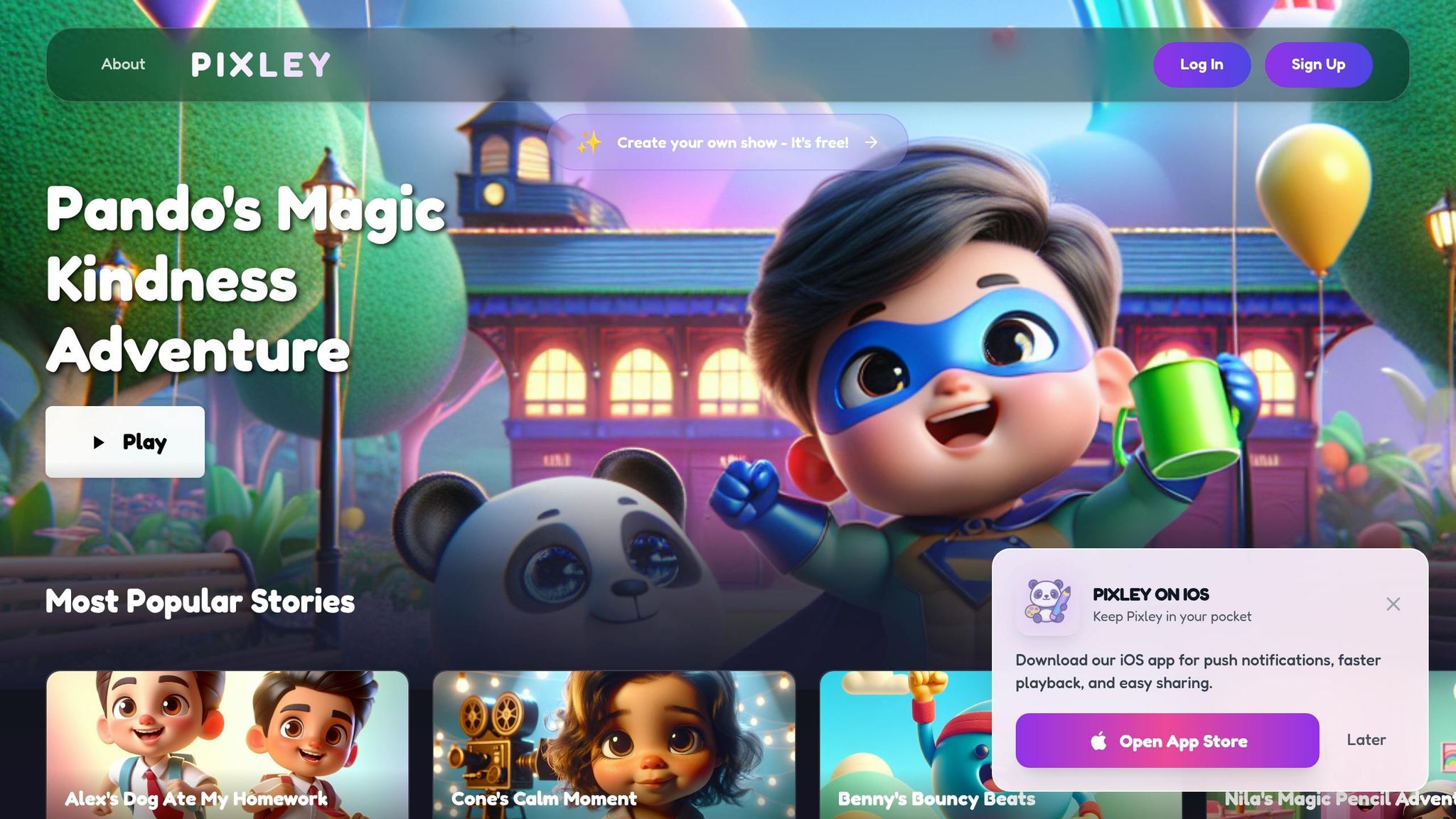
Pixley takes a fresh approach to edutainment by letting kids turn their drawings into personalized animated stories. This platform bridges the worlds of education and entertainment, giving children the chance to create and star in their own animated episodes. Within just three weeks of its late 2025 launch, Pixley reached over 1,000 families across 75 countries, showing how quickly parents embraced this engaging alternative to traditional screen time.
Engagement
Pixley transforms screen time into an interactive, creative process. Kids can draw characters on paper, upload them to the app, and watch their creations come alive in fully animated episodes. As co-founders Krish Iyengar and Pranit Agrawal explain:
"Pixley turns kids' drawings and ideas into personalized, high-quality animated episodes – guided by parents' educational and behavioral goals".
The platform also includes a feature called "Character Calling", where children can have real-time, AI-driven conversations with their animated characters. This not only sparks curiosity but also encourages positive communication habits. With 91% of parents reporting that their kids enjoy learning on Pixley, it’s clear that this blend of storytelling and interactivity keeps young minds engaged.
Skill Development
Pixley is more than just fun - it’s a tool for building essential skills. Research highlights that Social and Emotional Learning (SEL) programs can improve academic performance by 11 percentile points. Pixley integrates SEL by focusing on skills like empathy, resilience, and teamwork through parent-guided story themes. Parents can customize episodes to teach topics ranging from math and science to literacy and moral reasoning, all while making the child the hero of the story. These interactive episodes also challenge kids with cause-and-effect scenarios, helping them develop problem-solving skills in a playful way.
Customization
Parents play a hands-on role with Pixley’s "director's chair" feature, where they can set behavioral goals like teaching kindness or improving sharing habits. The platform adjusts the complexity and pacing of stories based on the child’s reading level or mood. Families can even include themselves, siblings, or friends as characters, adding a personal touch to every story.
Pixley offers a free tier with 200 Pixley Stars and 1.5-minute videos per month. For families looking for more, the Pro plan starts at $11.99/month (annual) or $14.99/month, providing 1,000 Stars, 3-minute videos, and multi-language support.
Family Collaboration
Pixley turns screen time into a family activity. Parents can guide the learning process in real time, adjusting educational goals, asking questions about the story, and helping kids connect lessons to everyday life. This transforms the tablet from a passive babysitting tool into a shared learning experience. As the Pixley team puts it:
"Spark's mission? To supercharge your child's creativity, critical thinking, and problem-solving skills, all while making family time even more magical".
With 80% of kids using tablets for school or entertainment, Pixley offers a way to make that time more meaningful and collaborative.
Strengths and Weaknesses of Each App Type
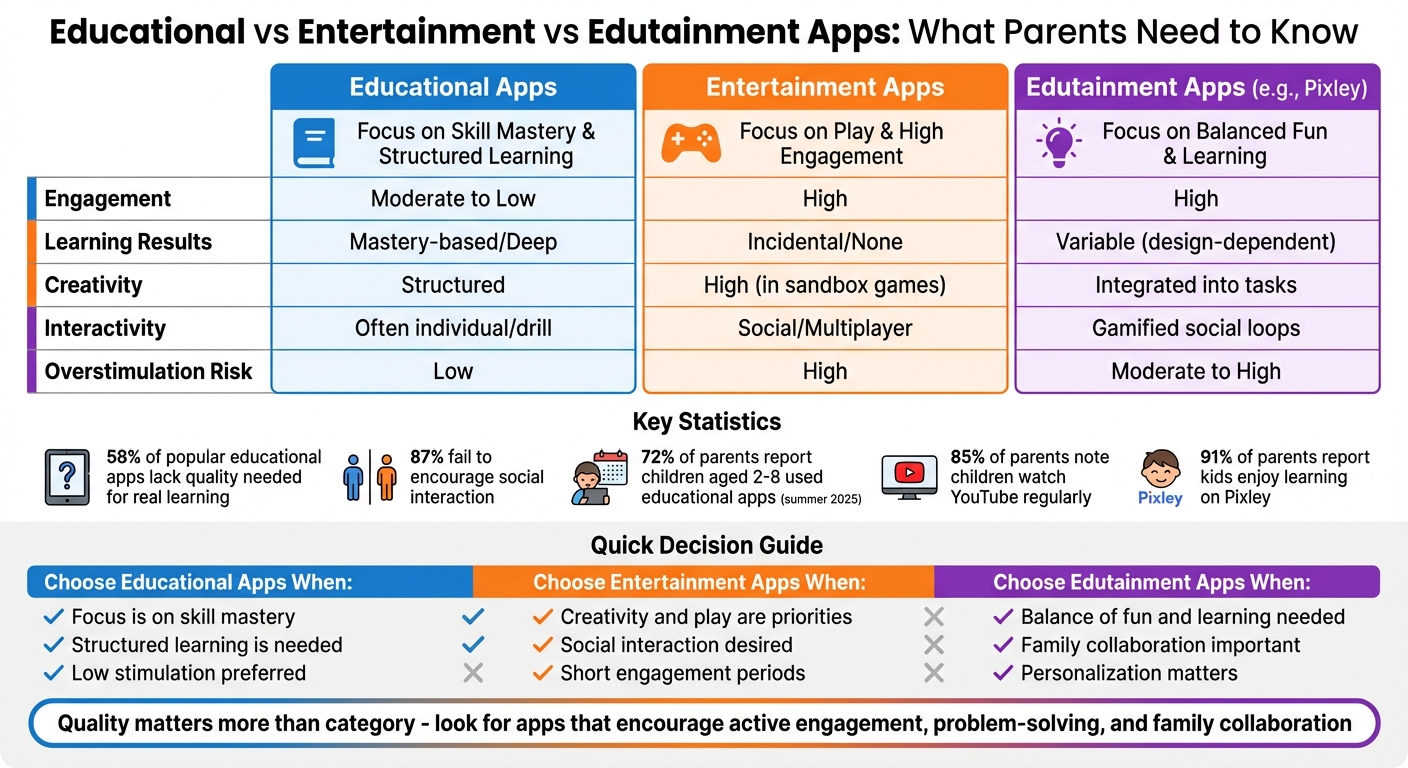
Understanding the strengths and weaknesses of different app types is key to selecting the best option for your child. Educational apps, entertainment apps, and edutainment platforms each bring distinct advantages - and challenges - to the table.
Educational apps shine when it comes to fostering deep learning. They focus on "minds-on" engagement, encouraging kids to actively solve problems instead of passively following steps. These apps often provide feedback that balances challenge with achievable rewards, explaining why certain answers are incorrect. However, their structured nature can feel dull to many kids, who might see them as digital worksheets rather than exciting tools for exploration.
Entertainment apps take a different approach, prioritizing engagement through immediate rewards and dynamic play. Features like interactive elements, avatars, and reward loops keep kids hooked by triggering dopamine-driven responses. While this makes them highly engaging, it often comes at a cost. Many of these apps promote passive activities - such as repetitive swiping - that can lead to overstimulation and even disrupt sleep. The issue of excessive screen time is significant, with studies predicting that by 2025, 85% of parents will report children aged 12 or younger watching YouTube regularly.
Edutainment platforms, like Pixley, aim to combine the strengths of both educational and entertainment apps. These apps often gamify learning, integrating rewards and interactive features. However, some fall into the trap of overemphasizing rewards - devoting as much as 80% of the experience to avatar customization and prize loops. Apps that mimic slot machines can distract from meaningful learning instead of encouraging active problem solving. As noted by Screenwise, the true educational value of an app depends on whether it promotes problem-solving or simply keeps kids clicking for rewards.
Ultimately, the quality of an app matters more than its category. Research highlights that 58% of the most-downloaded educational apps score poorly in fostering meaningful learning, while 87% fail to encourage social interaction. Despite this, families continue to seek better options, with 72% of parents reporting that children aged 2–8 used educational apps during the summer of 2025. The most effective learning outcomes occur when parents co-use these apps, offering context and feedback to reinforce the material.
Here’s a quick comparison of the strengths and risks associated with each type of app:
| Factor | Educational Apps | Entertainment Apps | Edutainment (e.g., Pixley) |
|---|---|---|---|
| Engagement | Moderate to Low | High | High |
| Learning Results | Mastery-based/Deep | Incidental/None | Variable (design-dependent) |
| Creativity | Structured | High (in sandbox games) | Integrated into tasks |
| Interactivity | Often individual/drill | Social/Multiplayer | Gamified social loops |
| Overstimulation Risk | Low | High | Moderate to High |
The table above highlights the trade-offs between engagement, learning outcomes, creativity, and the potential for overstimulation. Balancing these factors is essential for choosing the right app for your child.
Conclusion
Picking the right apps for your child doesn’t mean you have to choose between fun and education. The best apps blend the two seamlessly, allowing learning to happen naturally through play. Research highlights that kids thrive when digital tools encourage active engagement and meaningful interactions, rather than passive consumption.
By 2025, 80% of children used tablets, with those aged 5 to 8 averaging 3.5 hours of screen time daily. High-quality apps, when used for just an hour a week, can double learning growth in key academic areas. But this only works if the apps steer clear of "cognitive candy" - those addictive reward systems that distract from genuine learning.
Pixley offers a smart solution by transforming kids’ drawings and ideas into personalized animated stories. Its Spark feature reinforces learning through interactive storytelling, puzzles, and creative activities, designed for families to enjoy together. With 91% of parents saying their kids love learning with Pixley, it’s clear how effective this kind of edutainment can be. Personalized, interactive storytelling not only holds kids’ attention but also helps them retain what they’ve learned.
Parental involvement plays a big role too. Apps work best when parents join in - asking questions, discussing ideas, and helping kids connect what they learn digitally to the real world. Keep sessions short, around 10 to 20 minutes, and prioritize structured learning before moving on to entertainment. For example, if your child learns about shapes on an app, encourage them to spot those shapes around the house or during a walk.
The goal isn’t to eliminate screen time but to make sure it fosters creativity, critical thinking, and meaningful learning. Look for apps that challenge problem-solving, adapt to your child’s abilities, and encourage family interaction. By focusing on quality over flashy features, you’re equipping your child with tools that truly matter.
FAQs
How can I tell if an app teaches real skills?
To figure out if an app actually helps teach real skills, watch for a few key features. First, it should encourage active participation, not just passive scrolling or tapping. Look for apps that adjust to your child’s current abilities and offer tasks like problem-solving or decision-making that require thoughtful interaction.
Good apps also provide useful feedback - not just generic praise, but insights that help kids learn and improve. They should also push for critical thinking, challenging users to think deeper rather than just memorizing information. Finally, make sure the app is built on proven learning methods, ensuring it supports real development rather than just serving as a digital distraction.
What screen-time limits work best for learning?
The most effective way to manage screen time is to emphasize quality over quantity. Experts suggest focusing on interactive and educational apps that promote critical thinking and spark creativity. For kids aged 4 to 7, screen time should be carefully selected to provide meaningful and engaging experiences. For younger children, particularly those under 2, screen use should be very limited. When used, it should center on educational content and be paired with active, supervised learning to nurture their curiosity and growth.
How can I use Pixley to build my child's skills?
Pixley encourages skill-building in kids through fun, interactive activities such as co-creating AI-powered cartoon shows. Children can turn their drawings or ideas into custom animated stories, sparking creativity, critical thinking, and imagination. This hands-on approach not only enhances cognitive growth and storytelling skills but also helps kids explore moral concepts. Plus, parents can weave educational themes into the experience, making it both entertaining and enriching.
Keep Reading
- Teaching Visual Metaphors With Cartoons: A Parent and Teacher Guide
Learn how to teach visual metaphors to kids using cartoons, comic panels, drawings, and personalized stories. Help children connect images to feelings and ideas in simple steps.
- How Stories Build Emotional Intelligence in Kids
Learn how stories build emotional intelligence in kids by helping them name feelings, practice empathy, and build calm responses through reading, role-play, and Pixley.
- Age-Appropriate Digital Stories for Kids: Parent Guide
Learn how to choose age-appropriate digital stories for kids, with tips for story length, pacing, safety, co-viewing, and creative screen time.
- All parenting & screen-time guides →